

Settings
How to change your details, password, language, notifications and plan limits.
Open Settings.
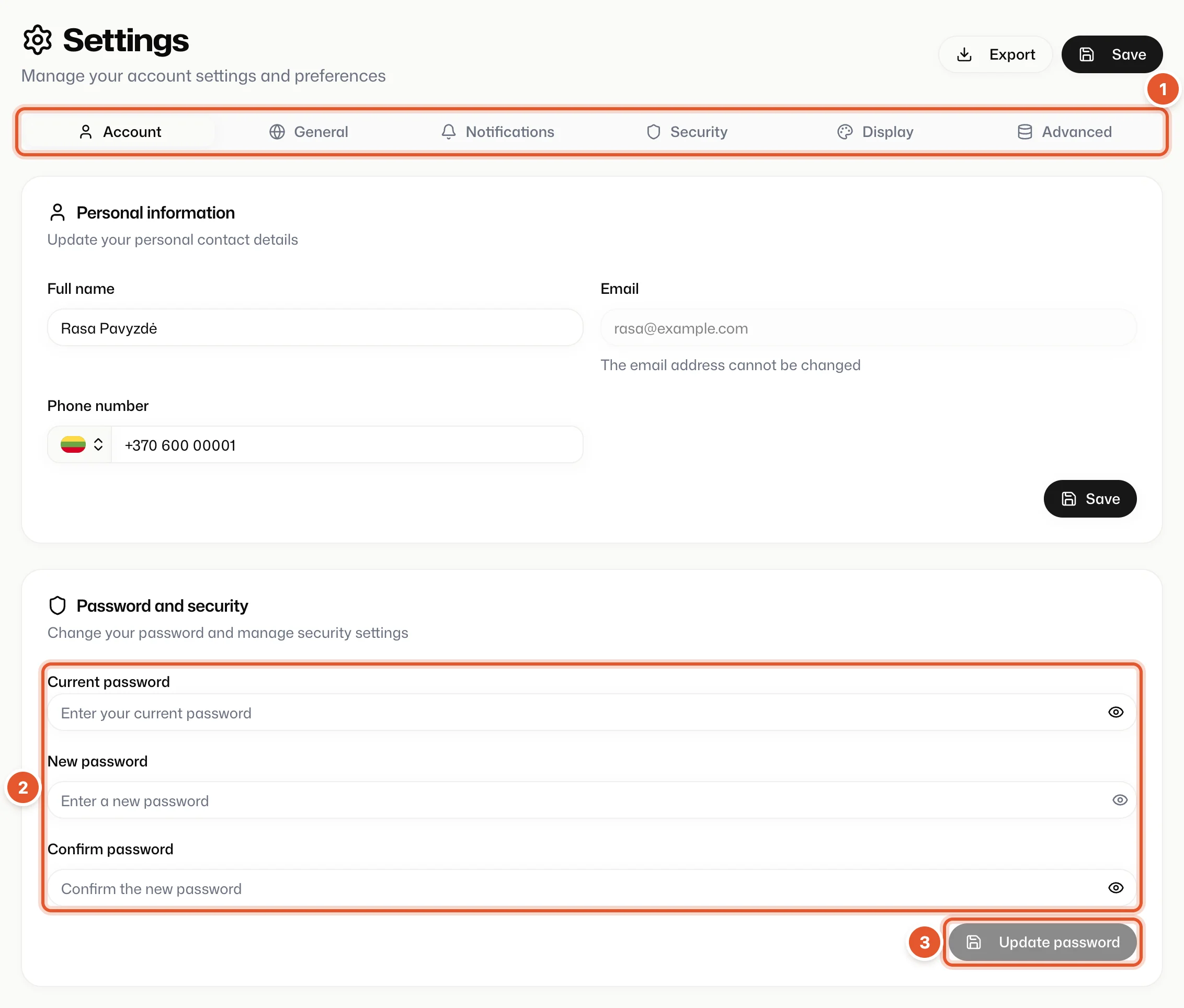
- 1. Tabs — all the settings.
- 2. Password — the current one and the new one.
- 3. Update password — applies at once.
| Tab | What you change |
|---|---|
| Account | Name, phone, password. |
| General | Language and region. |
| Notifications | Which channels we notify you by. Plan limit warnings. |
| Security | Sign-in notifications and when to sign out. |
| Display | Light or dark, menu size. |
| Advanced | Data and deleting the account. |
Plan limits
When you reach 80 % or 100 % of a plan limit, we notify you through the chosen channels. Going over does not stop the service; the excess goes on the invoice.
If you do not want to go over, turn on the hard limit in the Notifications tab.
Deleting the account cannot be undone
Deleting the account removes all the data. If you only want to pause the service, write a support ticket.
If something goes wrong
| What you see | What to do |
|---|---|
| The password does not change | Type the current password. If you do not remember it, sign out and reset it. |
| The email cannot be changed | Write a support ticket – we will change it. |