

Points
How a customer earns points and pays part of a purchase with them.
The till adds the points itself once a customer is chosen. The line “Customer will receive” shows how many.
Your manager decides how many points are given and for what. Some purchase parts (promotions, gift vouchers) may earn none.
Pay part with points
Choose the customer and enter the amount.
Press Points or F4.
Type how many points to use, or pick a quick choice. Press Apply discount.
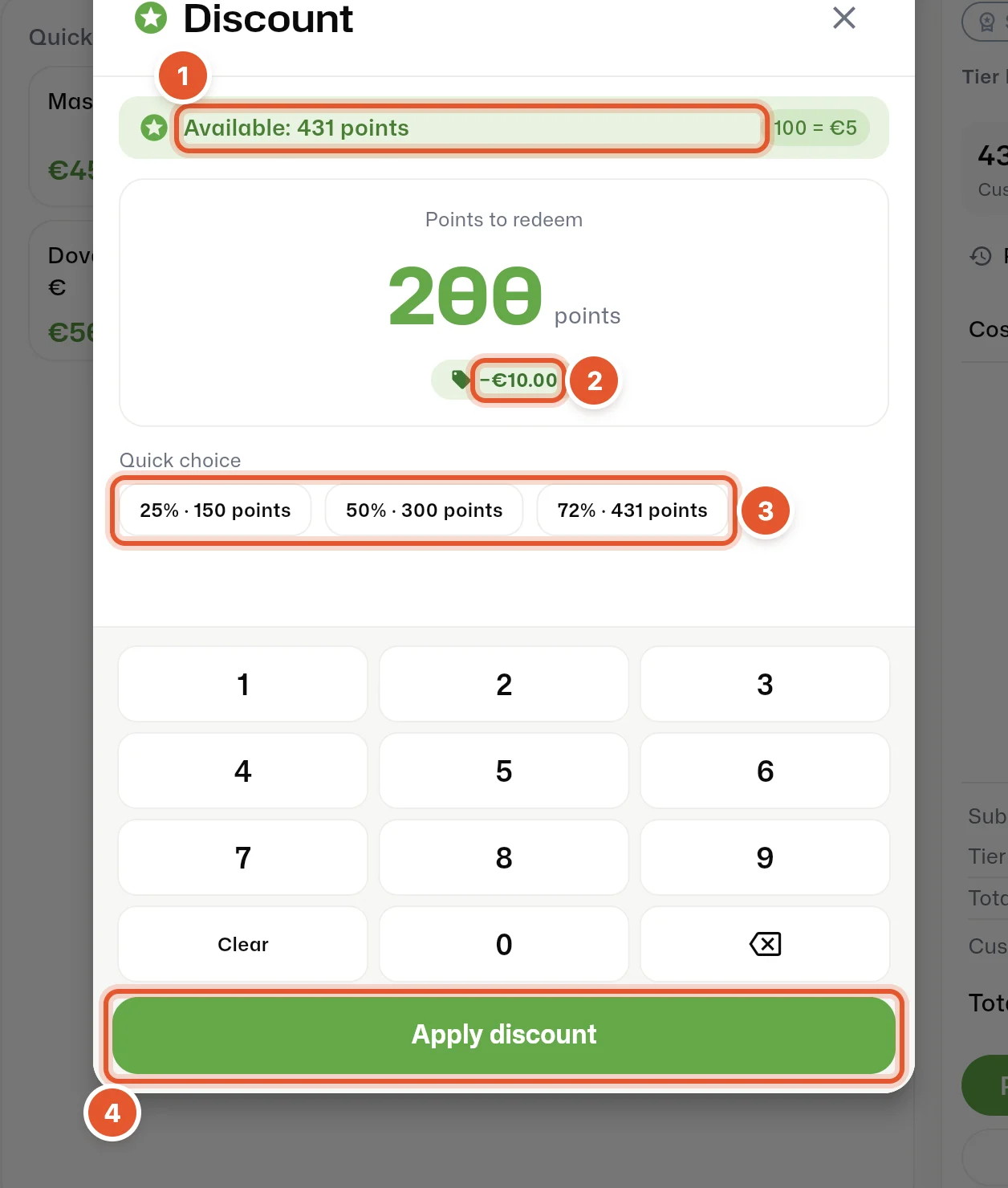
- 1. Available — how many points the customer has and what they are worth.
- 2. −€10.00 — how much comes off the amount.
- 3. Quick choice — the most common amounts with one tap.
- 4. Apply discount — takes the amount off the purchase.
Points are taken only when the purchase is paid. Until then you can change or remove them.
If something goes wrong
| What you see | What to do |
|---|---|
| “Points redemption disabled” | No customer is chosen, or your manager has not turned redemption on. |
| “No points available” | The customer has no points yet. |
| “Points can cover at most €…” | Your manager set a limit. Use fewer points. |
| Points cannot be used for a treatment | This purchase part cannot be paid with points. |