

Till
A guide for cashiers – from signing in to refunds.
Download the whole guide (PDF)The till is the staff app “Loyalty.lt Staff”. It works on a computer, a tablet, a phone and in a browser.
The newest till version: 1.6.17, released 2026-11-26.
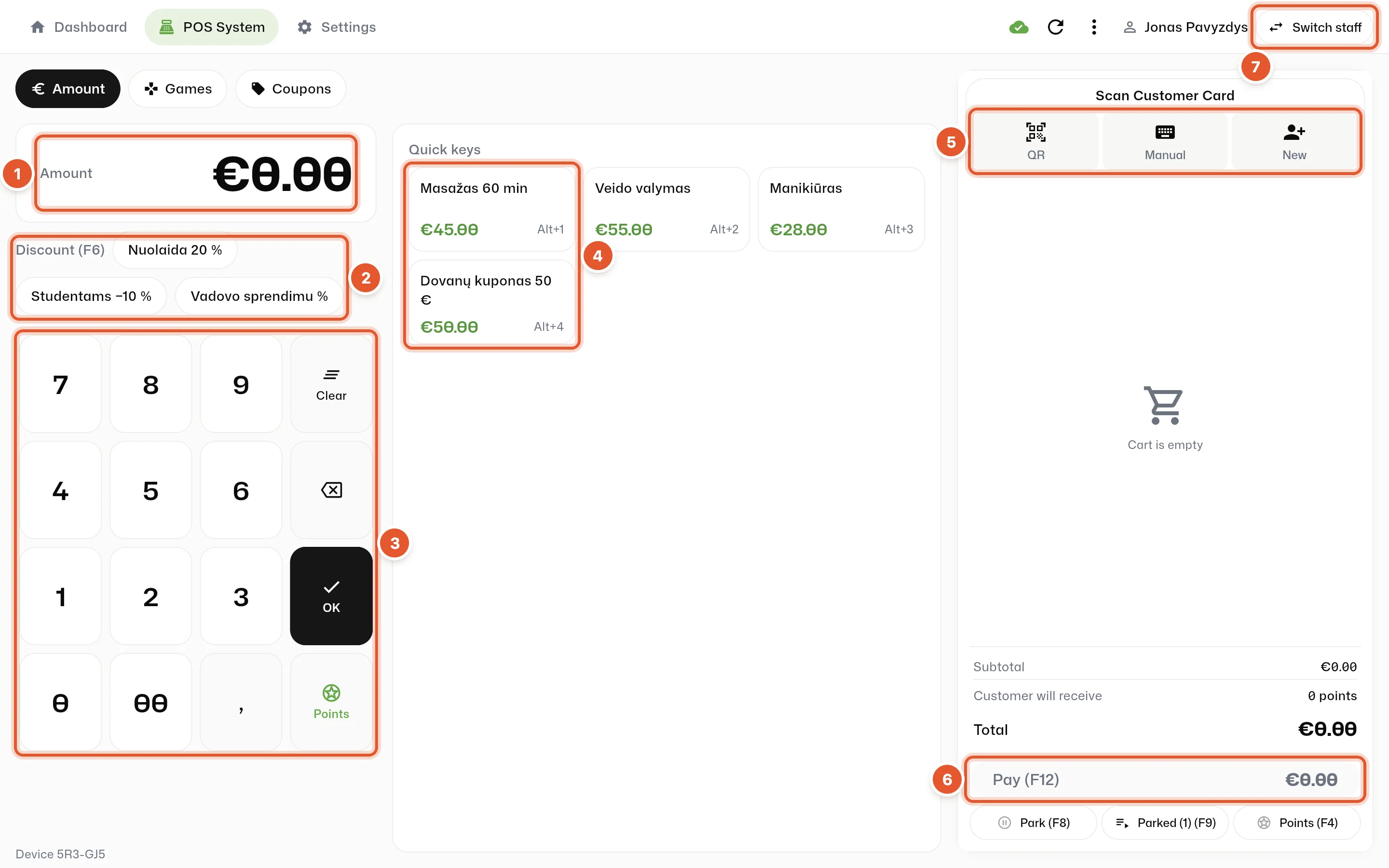
- 1. Amount — what you are entering now.
- 2. Discount (F6) — the discounts your manager allowed.
- 3. Keypad — to enter the amount with the mouse or a finger. Computer keys work too.
- 4. Quick keys — the most common amounts with one press.
- 5. Scan Customer Card — three ways to find or register a customer.
- 6. Pay (F12) — finishes the purchase.
- 7. Switch staff — another staff member signs in with their PIN.
I want to…
Start working
One page for a new cashier.
Sign in or switch staff
Code, PIN, “Who is working?” and the lock.
Find or register a customer
By card or phone, consent to news.
Enter an amount and apply a discount
One or more amounts, discounts, purchase parts.
Use points or a coupon
What points are worth and when they cannot be used.
Refund a purchase
All of it or a part.
Solve a problem
Connection, scanner, PIN, points.
What's new
What changed in each version.